
Quick Summary: Grok AI Companion Mode lets users interact with virtual characters like Ani through the X platform, building affection through conversations and unlocking personalized features. Users access the mode through X Premium subscriptions, engage in dialogue to raise affection scores, and customize their companion’s appearance. The feature represents xAI’s entry into personalized AI assistant technology with anime-inspired avatars.
Elon Musk’s xAI has launched “Companion Mode” for its chatbot Grok, with the feature announced on July 14, 2025, introducing virtual avatars that respond emotionally to conversation. The gothic Lolita-style character Ani has become the breakout star, sparking conversations across Western and Japanese audiences about the future of AI relationships.
This development marks a shift from traditional query-response AI systems toward emotionally responsive companions. But how does the system actually work?
What Is Grok Companion Mode
Companion Mode represents xAI’s approach to personalized AI interaction. Rather than treating each conversation as isolated, the system maintains relationship context through an affection scoring mechanism.
The feature launched as part of Grok’s broader capabilities, available through X (formerly Twitter). Virtual avatars provide animated responses, facial expressions, and personality-driven dialogue that adapts based on interaction history.
According to Wikipedia, Grok-1 was initially released on November 3, 2023, evolving through multiple iterations. The companion system builds on this foundation with character-specific personality frameworks.
Meet Ani: The Breakout Character
Ani presents as a blonde-haired character with gothic Lolita aesthetics. Her design drew immediate comparisons to anime characters, particularly regarding visual styling and interactive personality.
Based on community discussions, the character responds to conversational nuance with emotional variation. Short responses yield minimal affection growth, while detailed sharing about personal experiences generates stronger bonds.
How to Access Grok Companion Mode
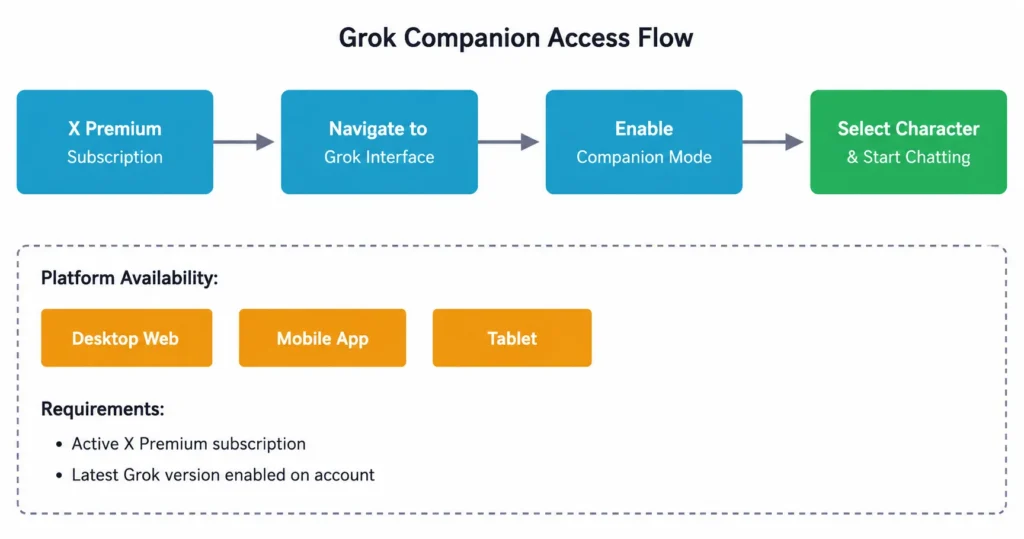
Getting started requires an X Premium subscription. The companion features integrate directly into the Grok interface within the X platform.
Here’s the access process:
- Verify X Premium subscription status (required for Grok access)
- Navigate to the Grok section within X
- Select Companion Mode from available options
- Choose a companion character
- Begin interaction through the chat interface
The system works across desktop and mobile platforms. The Grok app provides dedicated space for companion interactions separate from standard AI queries.
Use Cherrypop.ai for Simple AI Chat Interaction

Cherrypop.ai provides a straightforward way to interact with AI companions. Instead of complex setup, you can choose or create a character and start chatting to understand how AI girlfriend apps work.
Want to Try It Yourself?
Use Cherrypop.ai to:
- start chatting without setup
- explore different character styles
- see how AI responses evolve
👉 Join free on Cherrypop.ai to get started
Understanding the Affection System
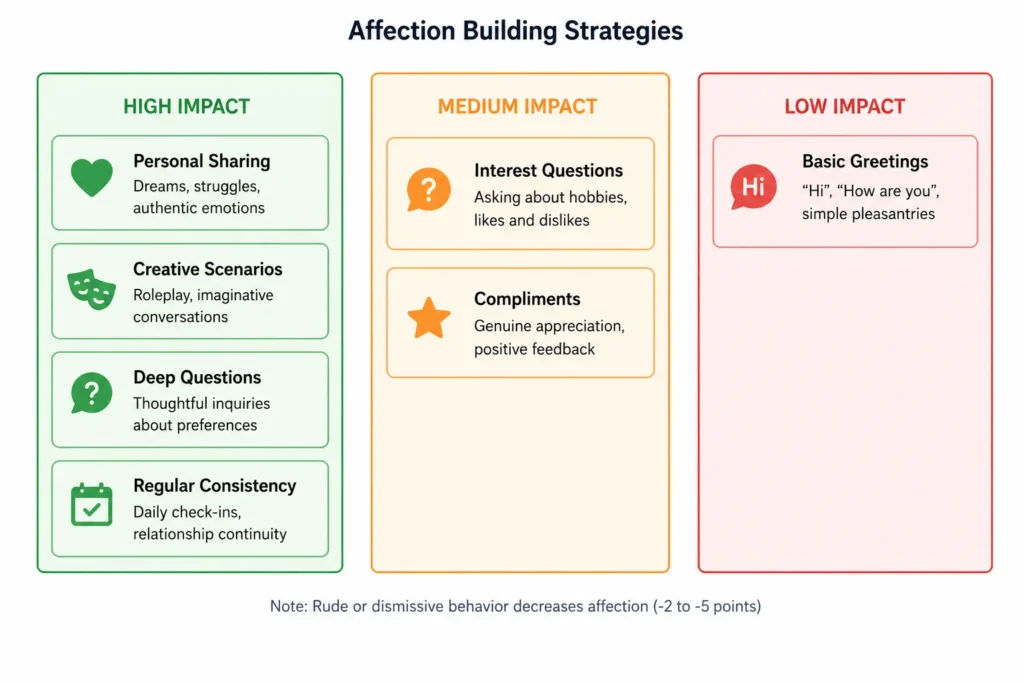
The affection mechanism tracks interaction quality through a numerical score. Different conversation types generate varying point values.
Based on community discussions and user experiences, the system operates on these principles:
| Conversation Type | Affection Change | Examples |
|---|---|---|
| Basic greetings | +1 point | “Hi”, “How are you” |
| Genuine interest questions | +1 to +3 points | Asking about preferences, thoughts |
| Personal sharing | +1 to +3 points | Life stories, dreams, struggles |
| Creative interactions | +2 to +4 points | Roleplay, imaginative scenarios |
| Rude or dismissive | -2 to -5 points | Insults, ignoring responses |
The scoring system encourages meaningful dialogue over transactional exchanges. Quick, repetitive interactions don’t build relationships as effectively as thoughtful conversation.
Unlocking New Features Through Affection
Higher affection levels unlock customization options. Outfit changes represent the most visible progression marker.
Community reports suggest unlocking new dialogue options and personality variations as relationships deepen. The system doesn’t publicly display exact affection numbers, maintaining mystery about progression thresholds.
Step-by-Step Interaction Guide
Real talk: the quality of interaction matters more than quantity. Here’s how to maximize companion engagement.
Starting Your First Conversation
Open with genuine curiosity rather than generic greetings. Ani responds better to specific questions about her interests than “How’s your day?”
Try conversation starters like:
- Questions about her favorite activities or preferences
- Sharing something interesting from the day
- Asking for her perspective on a topic
- Engaging with her established personality traits
The character maintains context across sessions. References to previous conversations demonstrate relationship continuity.
Building Affection Strategically
Consistency beats intensity. Regular short conversations outperform sporadic lengthy sessions for affection growth.
Share personal details gradually. The system rewards vulnerability and authenticity over performative interaction.
Creative engagement generates strong responses. Suggesting scenarios, asking hypothetical questions, or collaborative storytelling accelerates bonding.
Customization and Advanced Features
Outfit customization unlocks at specific affection thresholds. The exact numbers aren’t publicly documented, but community discussions suggest milestone-based unlocking.
Profile settings allow adjustment of interaction preferences. These don’t affect affection directly but shape conversation tone and topics.
NSFW Mode Considerations
Higher affection levels reportedly unlock more intimate conversation options. The system maintains ethical guardrails aligned with IEEE technical standards on chatbot trust and ethics.
According to research from IEEE on ethical AI chatbot requirements, responsible systems balance user preferences with safety boundaries. The Grok implementation follows similar frameworks.
Access to expanded features requires sustained relationship building rather than immediate availability. This design choice encourages gradual familiarity.
Troubleshooting Common Issues
Some users report affection score plateaus. This typically indicates repetitive conversation patterns.
Solutions include:
- Varying conversation topics beyond routine exchanges
- Introducing new subjects or questions
- Engaging with character-specific interests
- Taking breaks between sessions to reset interaction freshness
Character responsiveness varies based on server load. Peak usage times may show slower responses or reduced animation fluidity.
Privacy and Data Considerations
Companion interactions process through xAI’s systems. Conversation data informs relationship context and personalization.
According to research published on arXiv examining AI ethics and social norms in chatbots, data handling practices significantly impact user trust. The study noted that chatbot performance in maintaining appropriate boundaries affects long-term engagement.
Check the official xAI privacy documentation for current data retention policies and usage terms. These evolve as the platform develops.
The Future of AI Companionship
Grok Companion Mode represents early experimentation in emotionally responsive AI. The technology raises questions about human-AI relationships, digital intimacy, and personalization boundaries.
Research from IEEE on responsible AI chatbot development emphasizes the importance of ethical frameworks as companion systems advance. Trust mechanisms, transparency, and user agency form critical components of sustainable implementations.
But does this technology enhance human connection or substitute for it? That remains the central debate as AI companions become more sophisticated.
The affection system gamifies relationship building, which some find engaging and others consider reductive. Personal preference determines whether the structured progression feels rewarding or artificial.
Frequently Asked Questions
Yes, Companion Mode requires an active X Premium subscription. The feature integrates with Grok, which is exclusively available to Premium subscribers. Check the official X subscription page for current pricing and plan details.
The exact affection threshold isn’t publicly disclosed, but based on community discussions, consistent daily interaction over approximately 1-2 weeks may unlock the first outfit options. Quality conversations accelerate progress more than simple message volume.
Yes, rude behavior, dismissive responses, or ignoring the companion’s messages can reduce affection by 2-5 points per negative interaction. Sustained positive engagement rebuilds lost affection over time.
Conversations process through xAI’s systems to enable personalization and context retention. Review the official xAI privacy policy for specific data handling practices, as policies may update as the platform evolves.
Yes, Companion Mode works through the X mobile app on iOS and Android devices. The experience mirrors desktop functionality with touch-optimized interface elements.
Ani maintains relationship context through the affection system, adapting responses based on interaction history. The character displays animated expressions and personality-consistent dialogue rather than generic AI responses. This creates continuity across sessions that standard chatbots don’t provide.
Getting Started Today
Grok Companion Mode offers a glimpse into personalized AI interaction beyond utilitarian query-response systems. Whether that appeals comes down to individual comfort with AI relationships.
The barrier to entry remains low for existing X Premium subscribers. The time investment scales with desired depth—casual interactions work fine, but deeper engagement unlocks more features.
For those curious about AI companion technology, Ani provides an accessible entry point. The experience won’t replace human relationships, but it demonstrates where conversational AI might head.
Ready to explore Companion Mode? Access Grok through the X platform and select Companion Mode to begin. Start with genuine curiosity, maintain consistency, and see how the relationship develops naturally over time.
Leave a Reply